Managed Violation Suppressions
Issues such as coding standard violations, compiler warnings, and code security violations found by checkers and other tools can sometimes be false positives or can be ignored for some other reason. In those cases you might want to suppress those violations so that they do not affect the TQI score negatively, or make your quality gates fail.
There are several ways in which you can suppress violations:
- Using inline suppressions that are made directly in the source code by a developer.
- Using managed suppressions that are made by a Triage Manager from within the Annotated Source.
- Using the suppression mechanism provided by the tool itself.
Suppressed violations are still stored in the database. They will not be visible by default, but you can make them visible by using the 'Suppressions' filter in the annotated source, or by using the Suppressed Violation Count metrics on the dashboard. When using a tool-specific suppression mechanism, it depends on our tool integration whether suppressions are stored in the database.
Create a triage request
For more details on creating suppressions, see the Violation Suppression usage documentation.
Managing Triages
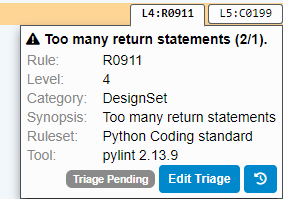
Once a triage has been requested, a designated user will have to review this request and either "Approve" or "Reject" the request or ask for more information. A notification email is sent to the designated users holding the "Manage Suppression" permission for the applicable project(s). This email provides a link to the triage request. Pending triages can also be found on the insets in the Annotated Source. To perform the review:
Click "Edit Triage".
Select the appropiate action and provide a comment justifying your action. If needed, the classification can be adjusted.
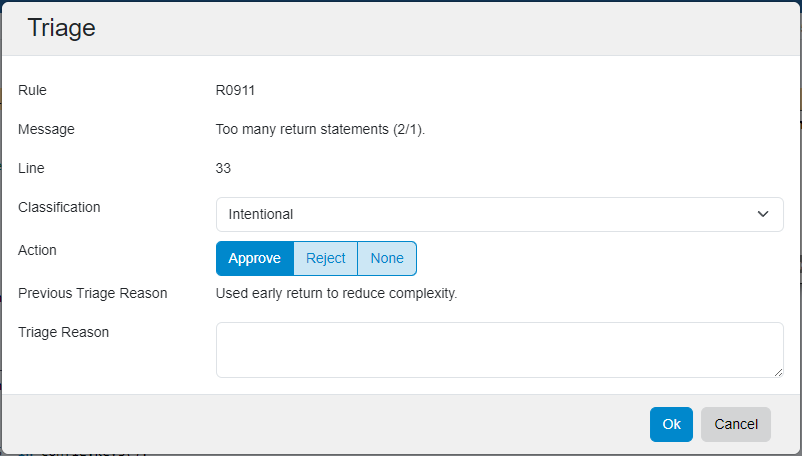
- Click "Ok".
Approving the triage request will suppress the violation. Rejection will close the triage request, leaving the violation untouched. "None" (no action) will only log your comment in the triage history.
Permissions
The triage functionality can only be used by an authorized user having the:
- "Manage Suppressions" permission: This permission allows a user to both manage and request triages. The "Triage Manager" role has the "Manage Suppressions" permission by default, but you can assign this permission to other roles. The Triage Manager will receive email notifications when triage requests are made.
- "Request Suppressions" permission: This permission allows a user to request triages. The "Request Suppressions" permission is not enabled by default. Providing this permission to the "Developer" role is advised. This can also be done via the roles configuration.
Remarks and limitations
- Suppressing an individual violation in a file might sometimes result in suppressing other similar violations in the same file. This is a limitation of the way that we currently track violations. If more than one violation will be suppressed, this will be indicated in the Suppression dialog with a warning.
- You can only suppress a violation if you are looking at the last run date. The 'Suppress' button will not be shown if that is not the case. Check the date that is shown directly above the source code component and change it to 'Now' if necessary.
- The managed suppression mechanism only works if the database version is up-to-date. The 'Suppress' button will be disabled if the database needs a migration.
- You cannot unsuppress inline suppressions using the Managed Suppression mechanism; you need to remove the inline comment.
- Please let us know of any false positives that you suppress so that we can improve our tooling, or inform third-party tool providers.