TICSQServer
TICSQServer is the main application that is used to fill the quality database.
TICSQServer is meant to be run regularly, e.g., on a daily (nightly) basis.
The steps of a TICSQServer run are described below. A full overview of all possible command line options is also given.
Running TICSQServer
TICSQServer [option...] [inputfile...]
TICSQServer accepts a list of inputfiles.
Each inputfile is a file or directory that
- possibly contains wildcards or
- is prefixed with '
@' to denote a project file
Note that all specified files must be within one of the specified views of the project (in the SERVER.yaml project configuration).
Authentication
The TICS Analyzer needs to authenticate itself when communicating with the viewer. Please refer to configuring an authentication token.
TQI Version
TICSQServer controls which TQI version should be used by the viewer to compute the TQI. Each time an analysis is performed, TICSQServer puts the TQI version that should be used for that analysis in the database. This is always the latest TQI version that TICSQServer supports.
Exit value
TICSQServer provides information about the status of the run as follows. In
case of a successful run the exit status is 0. In case of an
unsuccessful run, the exit code is an integer unequal to 0. The
exact value of a non-zero exit code is subject to the OS and the shell
interpreter in which the TICSQServer command is invoked.
Note that the semantics of the exit status is changed when running with the
-exitsqa option. When running with the -exitsqa
option, the exit value may still be non-zero in case of a "successful" run.
Namely, in case the run does not satisfy the QA criteria (i.e., fails to meet
the required QA targets).
Generate a temporary directory (Diagnostic data)
If you encounter an issue with TICSQServer and report this to your TICS representative, it can be that you are asked to provide a temporary directory or tmpdir of your run. This temporary directory contains various artifacts of the TICS run and log files containing all actions TICS has taken. As such, this directory contains useful debugging information for the TIOBE service engineer and the TICS development team to diagnose and resolve your issue. Dependent on your preferred way of working, there are two ways to generate this directory.
To generate a temporary directory from the command line, add the following
argument to your command line invocation to write a temporary directory to the
location of $TMPDIR.
TICSQServer $(your_args_here) -tmpdir $TMPDIR $(your_files_here).
So, to give an example of what this would look like if you wanted to write your
temporary directory to F:/tmp:
TICSQServer -project AppDatabase -recalc BEGIN,CS,END -tmpdir F:/tmp AppDatabaseClass.java
Steps of the Quality Database Update Process
TICSQServer runs for the project specified on the command line via the
-project option. For a project, new and changed files are
processed first, followed by any files that failed to be correctly processed
the last time.
TICSQServer processes files in this order for the following reason. When the time restrictions for the run are not large enough to analyze both the new and previously failed files, this arrangement allows all new files to be analyzed first. Since files that failed the previous run are likely to fail again (unless proper action has been taken), processing such files mostly consumes time without providing new data.
Before starting the update of the quality database, TICSQServer optionally performs the following step:
- If the property PREPAREQDB is set in the SERVER.yaml file, TICSQServer will run the given executable script or program. TICSQServer passes the project name, branch directory and branch name as its arguments to the PREPAREQDB script. This script can be used for instance to run a build, set necessary environment variables, etc.
After finishing the update of the quality database, TICSQServer optionally performs a post analysis step:
- If the property POSTQDB is set in the SERVER.yaml file, TICSQServer will run the given executable script or program. TICSQServer passes the project name, branch directory and branch name as its arguments to the POSTQDB script. This script can be used for instance to generate post analysis reports.
- Backup [
-nobackup] - Create a backup of the database. This step is optional and can
be suppressed via the
-nobackupoption. - Prepare [
-calc PREPARE] - Run any archive preparation steps. These include SCM updates and build steps.
- Changed Files [
-calc CHANGEDFILES] - Traverse the file system starting at the root of a branch set in the
PROJECTS.yaml and/or quality database and/or passed as a command line
option for the given project. Directories and files matching the
expressions in the ARCHIVE file are accepted and collected for further
processing.
Update the file information in the database.
- New files are added.
- Removed files are marked "deleted".
- Modified files (determined by a checksum based on the contents of a file) are updated. Updating a file means appending a new instance of the file to its life cycle.
- Build Relations [
-calc BUILDRELATIONS] - Calculate the build relations between source files and
make files. This is done for new or changed build files only.
First, the build file relations of changed build files are removed.
Next, for each build file all filenames within the build file are
collected and the relation is stored in the database.
If your relations of source file to build file are relatively easy to calculate (ie. the build file necessary will always be in either the source file's directory or a parent directory) then it is also possible to enable the PARTIALBUILDUPDATEONCALC option in the TICS configuration. If this is used, a
-calc BUILDRELATIONSwill also take individual changed source files into account, by doing a quick search of which potential makefile is likely to contain it. - Include Relations [
-calc INCLUDERELATIONS] - Calculate the include relations between source files (only C and C++) First, all the include relations of the changed source files are removed. Next, each source file is scanned for include files. Using the build file options, the actual included files (mostly header files) are found and the relations are stored in the database. This process is done recursively on all the included files (registering each relation only once to speedup the process and to avoid circular include problems).
- Lines of Code [
-calc LOC] - Calculate the Lines of Code (LOC). Lines of Code counts the actual number of lines excluding those lines that are considered generated as can be specified in the TICS LANGUAGES section.
- Effective Lines of Code [
-calc ELOC] - Calculate the Effective Lines of Code (ELOC). Effective Lines of Code are all source lines that actually contribute to the program. This excludes all blank lines, comment lines and lines that only contain braces.
- Lines of Code including Generated Code [
-calc GLOC] - Calculate the Lines of Code including Generated Code (GLOC). The result of this step is the number of lines of each file as it would be reported by an editor.
- Lines Added [
-calc LINESADDED] - Calculate the number of lines added to the source code lines. This is the number of lines added since the previous measurement.
- Lines Deleted [
-calc LINESDELETED] - Calculate the number of lines deleted from the source code lines. This is the number of lines removed since the previous measurement.
- Lines Changed [
-calc LINESCHANGED] - Calculate the number of lines changed with respect to the source code lines. This is the number of lines changed since the previous measurement.
- Change Rate [
-calc CHANGERATE] - Aggregation of Lines Added, Lines Deleted and Lines Changed.
- Accumulative Lines Added [
-calc ACCULINESADDED] - Calculate the accumulative number of lines added to the source code lines over the project's life-time.
- Accumulative Lines Deleted [
-calc ACCULINESDELETED] - Calculate the accumulative number of lines deleted from the source code over the project's life-time.
- Accumulative Lines Changed [
-calc ACCULINESCHANGED] - Calculate the accumulative number of lines changed with respect to the source code lines over the project's life-time.
- Accumulative Change Rate [
-calc ACCUCHANGERATE] - Aggregation of Lines Added, Lines Deleted and Lines Changed over the project's life-time.
- Unit Test Coverage [
-calc UNITTESTCOVERAGE/-calc UTC] - Calculate the test coverage of unit tests, based on data generated by external tools.
- Integration Test Coverage [
-calc INTEGRATIONTESTCOVERAGE/-calc ITC] - Calculate the test coverage of integration tests, based on data generated by external tools.
- System Test Coverage [
-calc SYSTEMTESTCOVERAGE/-calc STC] - Calculate the test coverage of system tests, based on data generated by external tools.
- Total Test Coverage [
-calc TOTALTESTCOVERAGE/-calc TTC] - Calculate the test coverage of total tests, based on data generated by external tools or aggregation of unit, integration and system test coverage data.
- Coding Standard Violations [
-calc CODINGSTANDARD/-calc CS] - Calculate the coding standard violations of each changed, new or previously failed file. All files marked as not checked are analyzed. These can be new files added, changed files whose contents has been modified or files that failed in the previous run. Files can fail to be successfully analyzed for various reasons. The file could not be compiled, the file was not in a makefile or internal analyzer problems stopped the analyzing process. If a file succeeds, all violations found are stored in the database.
- Compiler Warnings [
-calc COMPILERWARNING/-calc CW] - Calculate the compiler warnings. This takes warning output from the compiler normally used by the build process and turns these into violations. The violations are aggregated and can be shown as totals, per level or per category, just as for coding standard violations.
- Abstract Interpretation [
-calc ABSTRACTINTERPRETATION/-calc AI] - Calculate the abstract interpretation. This takes all files in the archive into account; not just the changed files. This is because this analysis exceeds file boundaries and analyzes inter-file relations.
- Code Security [
-calc SECURITY/-calc SEC] - Calculate the code security violations. This takes all files in the archive into account; not just the changed files. This is because this analysis exceeds file boundaries and analyzes inter-file relations.
- Cyclomatic Complexity [
-calc CYCLOMATICCOMPLEXITY/-calc CY] - Combines Average Cyclomatic Complexity and Maximum Cyclomatic Complexity (see below).
- Average Cyclomatic Complexity [
-calc AVGCYCLOMATICCOMPLEXITY] - Calculate the average cyclomatic complexity of each file. The average cyclomatic complexity of a file is defined as the sum of the cyclomatic complexities of all functions/methods defined in the file divided by the number of functions/methods in the file.
- Maximum Cyclomatic Complexity [
-calc MAXCYCLOMATICCOMPLEXITY] - Calculate the maximum cyclomatic complexity of each file. The maximum cyclomatic complexity of a file is defined as the maximum of the cyclomatic complexities of all functions/methods defined in the file.
- Fan Out [
-calc FANOUT] -
Calculate the fan-out of each file. Fan-out is dependency on other
coding units outside the current module. This is further split by three
different types of fan-out:
- Internal fan-out: dependency on coding units inside the software system
- External fan-out: dependency on coding units outside the software system
- Unclassified fan-out: dependency on coding units when it is not possible to determine whether dependencies are inside or outside the software system
- Dead Code [
-calc DEADCODE] - Calculate dead code in the archive. This takes all files in the archive into account. Dead code analysis attempts to find all functions that are not used and all files that are not buildable.
- Code Duplication [
-calc DUPLICATEDCODE/-calc DUP] - Calculate code duplication in the archive. This takes all files in the archive into account. Code duplication attempts to find all code fragments that are shared between at least two separate locations.
- Fix Rate [
-calc FIXRATE] - Calculate the fix rate for each file. Fix rate attempts to correlate problem reports from an issue tracker to a file. It tracks which files are changed to solve certain issues.
- Accumulative Fix Rate [
-calc ACCUFIXRATE] - Calculate the accumulative fix rate for each file. This tracks all issues related to the file's life time.
- Finalize [
-calc FINALIZE] -
- Generate the Organizational View.
- Generate viewer caches.
- Generate SQA reports.
- Send status mails.
- Post Analysis [
-calc POSTANA] - Run any post analysis steps.
Combining common steps with shortcuts
The following shortcuts can be used to combine common steps at the beginning and end of the analysis.
-calc BEGIN- Performs the following steps:
PREPARE,CHANGEDFILES,BUILDRELATIONSandINCLUDERELATIONS. -calc END- Performs the following steps:
FINALIZE, andPOSTANA.
Filtering metric steps by language
By using the -language option, it is possible to run metric
analysis steps only for a set of languages. This allows you to save time on a
run if you are currently only interested in new data for certain languages.
For instance, -language JAVA,PYTHON will only run analyzers for the
Java and Python code in your archive.
Automatic recalculation triggers on metrics
TICSQServer is able to detect certain changes in the analysis environment automatically, and will trigger automatic recalculations to bring your analysis data up to date to match the new environment.
The following triggers are available for all TQI metrics:
- Trigger a recalc on a changed or upgraded checker
- Trigger a recalc when the scope of analysis has changed (for instance, if an analysis of Code Duplication would take along more files than before)
The following triggers are available for violation-based metrics:
- Trigger a recalc on a change in the DEFINES.txt file. This is on by default: to disable this, change the RECALC: DEFINES option.
- Trigger a recalc on a change in the rules configuration
If automatic recalculations are not desired behaviour (for instance if a
full recalculation takes very long and this should only be done on schedule)
these can be disabled via the -noautorecalc option in the
TICSQServer invocation. This command line option will also override any
configuration options that enable recalculations.
Running multiple TICSQServer instances in parallel with the -parallel flag
To speed up your analysis, it can be useful to run multiple TICSQServer instances in parallel by
using the -parallel command line flag. Currently, it is possible to run TICSQServer
in parallel for all analysis metrics, while for all the auxiliary actions it is not possible.
-parallel option is not an internal option to
make use of multithreading! Instead, this is used to allow multiple TICSQServer processes to run
in parallel on the same database.
The actions that are currently not possible to run in parallel are the
CHANGEDFILES, BUILDRELATIONS, INCLUDERELATIONS
and FINALIZE actions.
CHANGEDFILES, BUILDRELATIONS,
INCLUDERELATIONS) or take actions that should only be done after all metrics are done
(FINALIZE). If you run any of these together with the -parallel option or use any aggregators
containing these (BEGIN, END, ALL) TICS will fail with
an error message disallowing these options.
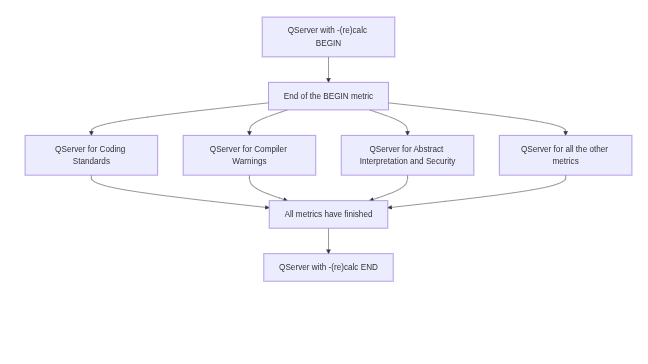
To give an idea of how you can parallelize your TICS runs, see the following
image. This shows how you would set it up; first a run with -calc BEGIN,
then a series of runs with -parallel and finally a -calc END.
Command Line options
The following TICSQServer options are allowed.
- -archivefile file
- use the given archive file for the archive extraction
- -branchname branch name
- calculate only the branch with branch name
- -calc metric
- calculate the specified (comma separated) metric type(s) [default: on]
- -config string
- use the given compiler configuration
- -deltaonly
- show only new violations relative to the database
- -err file
- write error messages to the specified file
- -exitsqa
- use the QA acceptation as exit code
- -help
- show this help info
- -language language
- calculate only files of the given language
- -level int
- show violations upto the specified level
- -log int
- show diagnostic messages upto the specified log level
- -logdir dir
- use the specified directory for server log files
- -new
- only check files that are new to the archive
- -noautorecalc
- do not trigger automatic recalculation due to ruleset changes or checker upgrades
- -nobackup
- do not backup the current version of the database
- -nocalc metric
- do not calculate the specified (comma separated) metric type(s)
- -noclobber
- do not overwrite the global log file (but append to it instead)
- -nodelta
- do not show deltas
- -nologo
- suppress TICS logo output
- -nomail
- do not send error or status mails
- -norecalc metric
- do not recalculate the specified (comma separated) metric type(s) for unchanged files
- -nosanity
- do not perform sanity checks
- -nowarn
- suppress all warnings
- -overviews
- show violation overview tables [default: on]
- -project string
- quality database to update
- -recalc metric
- recalculate the specified (comma separated) metric type(s) for unchanged files
- -results
- show violation messages [default: on]
- -setbaseline name[,delta:(0|1)][,plotline:(0|1)]
- set baseline name for a project
- -shownew
- annotate new violations relative to the database
- -showresolved
- show resolved violations in violation overview
- -showsuppressions
- show suppressed violations in violation overview
- -showsynopsis
- show rule synopsis in violation overview [default: on]
- -sort level|linenr|new
- sort the violations according to the specified criterion (default 'linenr')
- -st
- dump stack trace in case of errors
- -timeinfo
- show timing information on individual process stages [default: on]
- -tmpdir dir
- use the specified directory for intermediate files
- -today yyyy-mm-dd|yyyy-mm-dd HH:MM:SS
- run with the given timestamp as start date/time
- -totaloverviews
- show cumulative violation overview tables [default: on]
- -version
- show version info and exit